
Electronic Key Management Systems: The Complete Guide for 2026
Managing physical keys may sound like a small operational detail, but for any business that runs multiple locations, fleets, facilities, or shift-based staff, it becomes one of the most surprisingly costly and risk-prone parts of daily operations. A missing key can delay a customer handover, ground a vehicle, lock a housekeeper out of a floor, or trigger a security incident. This is why organizations across hospitality, automotive, fleet, corrections, healthcare, education, and corporate real estate are replacing pegboards, sign-out sheets, and basic lockboxes with electronic key management systems.
This guide explains what an electronic key management system is, how it works, the components and authentication methods involved, the benefits and ROI, compliance considerations, deployment options, industry applications, trends shaping the space in 2026, and how to evaluate the right solution for your business.
A Quick Note on Terminology
Before going further, it's worth clearing up a common point of confusion. The acronym EKMS is used in two very different contexts:
Physical key management — the focus of this article. These are secure cabinets, software, and authentication systems that control access to physical keys such as car keys, room keys, and facility keys.
Cryptographic key management — a completely different field involving the generation, distribution, and protection of digital encryption keys, most famously in the U.S. National Security Agency's Electronic Key Management System for communications security (COMSEC).
This article deals exclusively with the first: physical, real-world keys that open real-world locks. You will also see this category described as an electronic key control system, automated key management system, smart key cabinet, key tracking system, or simply a key management system (KMS). These terms are largely interchangeable.
What Is an Electronic Key Management System?
An electronic key management system is a secure, automated solution that stores physical keys, controls who can access them, and creates a complete digital record of every key movement. Rather than relying on a pegboard, a locked drawer, or a sign-out sheet, the system uses a combination of a secure cabinet, authentication hardware, smart key fobs or tags, and management software to make sure the right person can access the right key at the right time, and that every transaction is logged automatically.
The result is something that traditional key storage cannot provide: real accountability. You always know who has each key, when they took it, and when they returned it, with no reliance on manual log entries or honor-system sign-outs.
How an Electronic Key Management System Works
Although implementations vary, most systems follow a similar workflow:
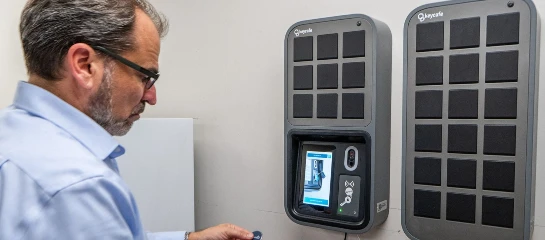
Authentication. A user approaches the cabinet and identifies themselves using a PIN, RFID card, fingerprint, mobile credential, QR code, or a combination of methods.
Authorization. The software checks that user's permissions against the key they are requesting. Permissions can be based on role, location, time of day, day of week, certifications, or any combination.
Release. If the user is authorized, the cabinet unlocks the specific slot (or in some designs, the full cabinet) for the approved key only. All other keys remain secured.
Logging. The system automatically records the user, the key, the time, and any associated metadata. Admins can see this in real time.
Monitoring. While the key is out, the system tracks its status. If it's not returned by a pre-set time or returned by an unauthorized person, alerts fire to admins.
Return. When the key is returned, the user authenticates again, the cabinet reads the fob or tag, and the return transaction is logged, closing the audit loop.
This entire cycle typically takes seconds. The critical difference from a traditional key cabinet is that every step is automated, timestamped, and tied to a specific person, which makes the data reliable enough to be used for compliance, investigations, and operational analytics.
The Core Components
Modern systems are built around four components that work together:
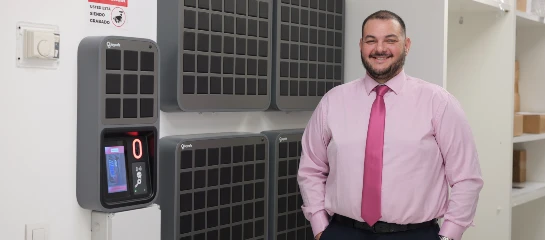
The secure cabinet. Purpose-built steel enclosures designed to resist forced entry. Each key or keyring sits in its own slot or on a locking peg. Cabinet sizes range from small wall-mounted units storing a few dozen keys to multi-cabinet installations storing thousands.
The authentication terminal. This is how users identify themselves to the system. Options have expanded significantly over the past few years, and most modern systems support multiple methods at once (more on that in the next section).
Smart key fobs or tags. Each key or key bundle is permanently attached to an electronic identifier, typically an RFID or NFC chip. These identifiers let the system recognize each key individually and detect when it's been removed, returned, or swapped between slots.
Management software. The software layer is where most of the real value lives. It handles user management, permission rules, live dashboards, alerts, reporting, and increasingly, integrations with other business systems. Cloud-based platforms let administrators manage keys across dozens or hundreds of locations, from any device.
Authentication Methods: The Expanding Menu
Authentication has evolved well beyond the original PIN-pad model. A modern buyer should expect to see options including:
PIN codes — the baseline, simple and universal, best combined with another factor.
RFID / proximity cards and fobs — tap-based, often tied to existing employee badge systems.
Fingerprint biometrics — strong individual accountability, though hardware reliability varies by vendor and environment.
Mobile credentials — using a smartphone as the key, often via Bluetooth or NFC.
QR codes — scanned from a user's phone, useful for visitors, contractors, or one-time access.
Mobile wallet passes — credentials stored in Apple Wallet or Google Wallet, so there's nothing to install.
Multi-factor authentication (MFA) — combining two or more of the above for high-security keys.
Industry analysts expect passwordless, smartphone-based access to become the dominant pattern over the next few years, with some vendors piloting Ultra-Wideband (UWB) credentials for even more precise proximity control. If you're evaluating systems today, flexibility in authentication is a meaningful future-proofing consideration — a system locked to a single method will be harder to adapt as workforce expectations shift.
Deployment Models: Cloud-Native, Cloud-Enabled, or On-Premises
One of the first architectural questions to ask is how the system is hosted. There are three broad models:
Cloud-native systems are built from the ground up to run in the cloud, with mobile-first interfaces, continuous updates, open APIs, and multi-site management as core design principles. They scale easily across locations, update automatically, and typically integrate best with modern business tools.
Cloud-enabled systems are legacy on-premises products that have been adapted to communicate with a cloud interface. They work, but the underlying architecture often limits scalability, integration, and mobile usability.
On-premises systems keep everything local — software runs on your own servers, typically at a single site. This appeals to organizations with strict data residency requirements or air-gapped environments, but it comes with higher IT overhead, harder multi-site management, and more friction when rolling out updates.
For most businesses today, cloud-native is the default choice. Organizations in regulated government, defense, or critical infrastructure sectors may still justify on-premises, but the gap in capabilities continues to widen each year.
Benefits of Electronic Key Management
Enhanced Security and Access Control
Every key transaction is tied to an authenticated individual, which eliminates the "someone took it" problem that plagues shared key rings and paper logs. Permissions can be granular — this user, this key, these hours, these days, and changes propagate instantly. When an employee leaves, their access is revoked in seconds, not when someone remembers to collect their badge.
Full Audit Trail and Accountability
Every pickup, return, denied attempt, and late return is recorded. This data is the foundation of real accountability. When something goes wrong, you have evidence. When nothing goes wrong, you have documentation that proves your process is working, which matters for audits, insurance claims, and internal investigations.
Operational Efficiency
Automating check-in and check-out removes administrative overhead. Front desks, dispatch offices, and fleet yards stop playing key traffic controller. Employees can retrieve keys directly without waiting for a manager to unlock a cabinet or sign them out. For shift-based operations, the time savings compound quickly.
Reduced Key Loss and Rekeying Costs
Lost keys are expensive, and the cost is rising. Modern vehicle keys in particular can run hundreds of dollars to replace once programming and security chips are factored in, and some high-end models cost over $1,000. Electronic systems dramatically reduce loss rates by ensuring every key is either secured in the cabinet or accounted for against a named user.
Insurance and Liability Benefits
A growing number of insurers in the automotive, fleet, and property sectors treat formal, auditable key management as a factor in coverage and premiums. For organizations handling high-value assets — vehicle inventories, commercial property portfolios, regulated pharmaceuticals — having a documented, automated system can reduce premiums and strengthen your position after any incident that leads to a claim.
Real-Time Visibility Across Locations
For any business running multiple sites, the ability to see key status everywhere from a single dashboard changes how operations are managed. Regional managers can spot patterns, a location with chronically late returns, a particular shift where keys go missing, a user whose access attempts keep getting denied, without travel between sites.
Compliance Support
Industries with regulated access control benefit from having automatic documentation that meets or supports frameworks like ISO 27001 (information security), SOC 2 (service organization controls), HIPAA (healthcare), GDPR (data protection), PCI DSS (payment environments), BS 7984 (key-holding and response services), and sector-specific standards in corrections, aviation, and critical infrastructure.
Integrations: Where Modern Systems Pull Ahead
Perhaps the single biggest gap between first-generation electronic key cabinets and modern cloud-native systems is integration. A modern system should not live in isolation; it should exchange data with the rest of your stack.
Useful integrations typically include:
Identity and HR systems (HRIS) — so new hires, role changes, and departures automatically update permissions.
Access control systems — so the same credential that unlocks a door can release a key.
Fleet and dealer management systems (DMS) — so key activity ties back to vehicle records, service tickets, and test drives.
Property management systems (PMS) in hospitality — so room and maintenance key access aligns with housekeeping and guest workflows.
Video surveillance — so cabinet events can be correlated with camera footage automatically.
Workflow automation platforms such as Zapier — so any business tool in your stack can react to key events.
Open APIs and webhooks — so your own systems can build custom integrations without vendor lock-in.
Organizations that skip integration planning often end up with what industry analysts are calling "access debt" — a growing gap between who actually has access and who the system thinks has access, leading to audit findings, insurance issues, and security risk.
Industry Applications
Hospitality
Hotels use electronic key management to control back-of-house keys (housekeeping floors, maintenance, food and beverage, storage, laundry, office areas) separately from guest room access. Staff retrieve keys without tying up the front desk, managers track returns shift by shift, and large brands use multi-site dashboards to oversee dozens or hundreds of properties centrally. A common problem electronic systems solve: staff accidentally taking master or section keys home at the end of a shift, which happens more often than most hotel ops teams admit.
Automotive Dealerships
Dealership key management is a classic "small problem, big cost" scenario. Lost keys on a dealership lot mean unsaleable inventory until a replacement key (often costing hundreds of dollars) is cut and programmed. Electronic systems prevent chaotic key hunts, speed up test drives, enable after-hours service drop-offs and pickups, and integrate with DMS platforms so key events are tied to VINs, customers, and service orders.
Fleet Management
For rental companies, logistics operators, and any business running pool vehicles, the ability to distribute vehicle keys without a human intermediary is transformative. Drivers authenticate at the cabinet, pick up the assigned vehicle key, and go. Managers track utilization, enforce certification requirements (for example, only drivers with current CDL endorsements can pick up Class 8 truck keys), and audit who had which vehicle at any moment.
Law Enforcement and Corrections
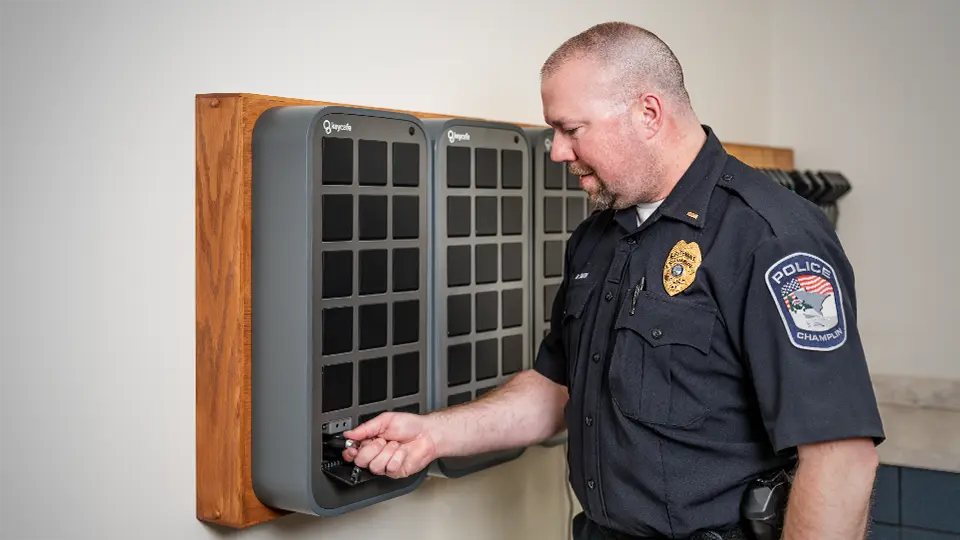
Police departments use electronic key cabinets to manage patrol vehicle keys, evidence room keys, armory keys, and equipment room keys with the level of individual accountability these environments demand. A documented case: a Minnesota police department installed an electronic key management system to eliminate persistent patrol vehicle key loss issues and improve officer accountability.
Corporate and Commercial Real Estate
Building managers, facilities teams, and property managers control access to server rooms, utility rooms, maintenance areas, executive offices, and after-hours spaces. For contractors and service providers, self-managed access (scheduled windows, one-time codes, QR-based pickups) replaces the old "meet me in the lobby with the key" workflow.
Healthcare
Hospitals and clinics secure medication storage, equipment rooms, patient care areas, and administrative offices, with audit trails aligned to HIPAA requirements. Shift-based access rules map naturally to nursing schedules.
Education
Universities, school districts, and campuses use electronic systems for dorm master keys, classroom keys, lab access, athletic facility keys, vehicle keys for campus fleets, and maintenance access.
Construction and Industrial
Controlled access to dangerous equipment keys, job site vehicle keys, and tool cage keys ensures only certified personnel operate specific equipment. Time-based rules reflect shift schedules and safety protocols.
Data Centers and High-Security Facilities
High-value environments use electronic key management as one layer in a defense-in-depth model, often combined with MFA, video verification, two-person integrity rules, and access control integrations.
ROI and Cost Considerations
What Systems Typically Cost
Electronic key management systems span a wide price range depending on capacity, features, and deployment model:
Entry-level systems for small businesses with a single cabinet typically start in the low thousands of dollars.
Mid-market systems with cloud software, multiple authentication methods, and moderate capacity generally run in the mid-to-high four figures.
Enterprise deployments across multiple sites, with advanced integrations, can run well into five figures or more, though modern subscription and financing models have made entry more accessible than the traditional capital-purchase model.
Ongoing costs typically include software subscriptions, support, and occasional hardware refreshes.
Where the Savings Come From
The ROI case rests on several buckets of savings and avoided costs:
Avoided key replacement and rekeying — especially for modern vehicle keys with embedded electronics.
Recovered labor time — no more manual logs, no more hunting for missing keys, no more waiting for a manager to unlock the cabinet.
Reduced downtime — a vehicle or facility that can't be accessed isn't generating revenue.
Lower insurance premiums — for organizations where insurers weigh key management in their underwriting.
Avoided security incidents — theft, unauthorized access, and the associated liability.
Faster audits — hours or days saved when an auditor requests historical access records.
A Simple ROI Illustration
Consider a business that loses five keys per year at an average replacement cost of $500 each, and spends another $3,000 annually in staff time on key administration and key-hunting. That's $5,500 per year in direct costs before any incidents. A system that eliminates 80% of losses and automates the admin work recovers most of that spend. Add insurance benefits, avoided downtime, and prevented incidents, and most customers see payback well within the first year or two — often faster in high-churn industries like automotive and hospitality.
Traditional Key Cabinets vs. Electronic Key Management
Feature | Traditional Key Cabinet | Electronic Key Management System |
|---|---|---|
Access control | Anyone with cabinet access | Per-key permissions per user |
Record-keeping | Manual logs, often incomplete | Automated, tamper-resistant digital logs |
User identification | Signature or initials | Verified authentication (PIN, RFID, biometric, mobile) |
Security monitoring | None; losses discovered after the fact | Real-time alerts for overdue or unauthorized access |
Multi-site visibility | None; each cabinet is an island | Centralized dashboard across all locations |
Integrations | None | APIs, HRIS, access control, DMS, Zapier, etc. |
Scalability | Linear — more cabinets, more overhead | Near-zero marginal admin cost per new cabinet |
Compliance support | Manual, fragile | Automated reporting aligned to common frameworks |
After-hours access | Requires staff | Self-service with audit trail |
Upfront cost | Lower | Higher |
Long-term cost | Higher (losses, labor, incidents) | Lower (automation, prevention) |
Key Trends Shaping 2026 and Beyond
Mobile and Passwordless Access
The industry is moving away from hardware fobs toward smartphone-based credentials — QR codes, mobile wallet passes, Bluetooth, and NFC. The upside is clear: no cards to lose, no fobs to reissue, and credentials that can be revoked instantly from anywhere.
IoT-Enabled Cabinets and Edge Resilience
Modern cabinets are effectively IoT endpoints: networked, sensor-rich, and cloud-connected. The best ones also include edge logic so they keep enforcing access rules locally during network outages, then sync once connectivity returns. This "edge resilience" matters for remote depots, temporary sites, and anywhere reliable internet isn't guaranteed.
AI-Assisted Anomaly Detection
Machine learning models are starting to flag unusual key access patterns, a user who normally picks up one key suddenly pulling ten, access attempts outside normal hours, frequent denied attempts. Early deployments focus on giving security teams a signal worth investigating rather than replacing human judgment.
Deep Integration With Business Systems
Key management is increasingly treated as part of the broader identity and access fabric of a business, not as a standalone tool. Expect more native connectors to HRIS, ITSM, fleet, and property management platforms.
Zero-Touch Multi-Site Provisioning
Modern cabinets ship pre-configured and pull their settings down as soon as they connect. Deploying a new location should take minutes, not days. This is now table-stakes for enterprise buyers.
Sustainability Considerations
Fewer lost keys means fewer rekeying operations, less metal and plastic waste, and fewer replacement shipments, a minor but real sustainability argument that's beginning to appear in procurement criteria.
How to Evaluate an Electronic Key Management System
A short buyer's checklist to use when comparing options:
Authentication flexibility — does it support multiple methods, including mobile-based ones?
Deployment model — is it truly cloud-native, or a legacy product with a cloud wrapper?
Multi-site management — can you manage all locations from a single dashboard with appropriate permission scoping?
Offline resilience — what happens when the internet goes down?
Integration surface — open API, webhooks, named integrations with the tools you already use?
Hardware footprint — capacity, physical security rating, power and network requirements, installation flexibility.
Reporting and exports — can you get the data out easily for audits and analysis?
Notification system — granular, configurable, delivered via email, SMS, and push.
Vendor pace of updates — are they shipping meaningful features annually, or stagnating?
Total cost of ownership — hardware, software, support, and the cost of future expansion.
Pilot and rollout support — do they help you plan, install, and train, or just ship the box?
Compliance and certifications — alignment with the standards that matter in your industry.
Example: Keycafe's Approach
Keycafe is a cloud-native electronic key management platform built around a connected hardware unit called the SmartBox. A few aspects of the approach are worth highlighting in the context of the trends above:
Multiple authentication options in one box, including PIN, RFID card, NFC Badge, QR codes, and mobile wallet passes — so organizations aren't locked into a single method.
Cloud-first architecture with a mobile app and web dashboard, designed for multi-site management from day one.
Offline-ready access so cabinets keep working through network and power interruptions.
Open integrations, including a Zapier connector that links key events to thousands of third-party tools, plus APIs for custom workflows.
Case study evidence from customers like Heiwa Group, SERVPRO, and Al Packer Ford Lincoln (a West Palm Beach dealership) demonstrating measurable gains in accountability and time savings.
Conclusion
Electronic key management systems have moved from a specialized security tool to a mainstream operational system for any business that depends on physical keys. The combination of secure hardware, flexible authentication, cloud-based software, and deep integration with the rest of the business stack turns what used to be a chronic source of friction and risk into a managed, measurable process.
For organizations still running on pegboards, sign-out sheets, or first-generation electronic cabinets without cloud capabilities, the gap to what modern systems can deliver is now large — and widening each year as vendors build out mobile credentials, IoT resilience, AI-assisted monitoring, and integrations that tie keys directly into the broader business. The best time to modernize was a few years ago. The second-best time is before your next key incident.
If you're evaluating options, use the buyer's checklist above, talk to vendors about the specific integrations and compliance needs your industry has, and ask for case studies from organizations that look like yours. And if you'd like to see what a modern cloud-native system looks like in practice, Keycafe is happy to show you.