With the price of new and used vehicles continuing to climb, more people are choosing to keep their cars. And, for your auto repair shop, that means more business. But, of course, more business means more customers and the need for customer key control.
From the point when customer car keys are dropped off at the front desk to when they go to the bay and back, there are multiple opportunities for keys to fall off the clipboard, get lost in the car, or be mistakenly dropped into a pocket.
Even if a key is briefly misplaced, it can mean a loss of valuable repair time and delays while you and your employees search for it. If the worst happens and it's lost, you can have a customer service nightmare that quickly shows up on Yelp, Facebook, or other social media.
Fortunately, with Keycafe's key management system, this doesn't have to happen to you. While your customer's vehicles are receiving the best care, you'll have key control by knowing precisely where customer keys are, preventing delays, customer service problems, theft, and bad reviews.
In addition, with key fob costs approaching $1300 on some vehicles, Keycafe can help prevent your auto repair shop from absorbing the expense of replacing customers' keys and increase your reputation as a top customer service shop.
Auto Repair Shop Key Management Challenges
This comment from a mechanic may sound familiar to you:
"I used to work at a shop, and we would clip the key with the work order onto a clipboard for each car. Of course, we had multiple occurrences of missing keys because of staff forgetting to place the keys back onto the clipboard after the work was done. And often, after driving the car out into the lot, mechanics would accidentally take keys home in a pocket, or drop the key in a different car. And when the customer came in to pick up their vehicle, we had to scramble to find the key."
You may have experienced these types of situations this week. Repairing vehicles comes with the constant stress of balancing repairs and scheduling with customer needs. And during the rush of getting repairs completed on time, keeping track of keys can be challenging. One of the best options to address key control needs is a Keycafe key management system.
Keycafe's easy-to-use design easily controls access to keys, whether transferred off-site, serviced, or delivered to the customer. With Keycafe, you'll have complete key control from when your customer's vehicles are dropped off to when they're returned.
Additionally, key control becomes simple, up-to-date, and accessible to as many or as few people as you would like. You'll have real-time information on when the vehicle arrived, who worked on it, and when the key was returned.
Also, if you have multiple repair shops, Keycafe's key cabinets can be networked to provide complete key control - regardless of the location. As a result, you'll have real-time awareness of your customer vehicles 24/7.
How Does Keycafe Work?
Although Keycafe's system is easily adapted to you, a workflow could look something like this:
When a customer drops off their car, an employee creates a key in Keycafe's software. A unique key code is automatically generated and shared with the customer.
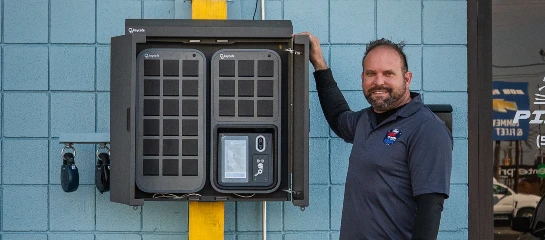
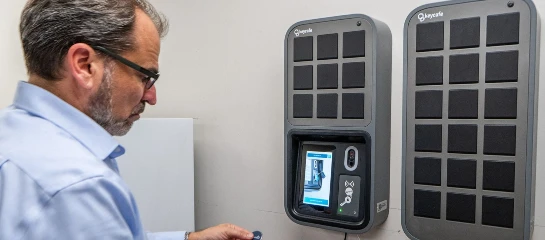
An NFC fob with a unique serial number is physically attached to the key. This serial number is tied to the key in Keycafe’s software. The key is then placed into the Keycafe SmartBox.
The repair tech picks up the key using their own unique staff code. The staff member’s name and time of the key pickup are automatically logged.
After the work is done, the key is placed back in the SmarBox using the staff code, again logging the name and time.
Your customer can pick up the key from the SmartBox using the key code during or after work hours.
The staff is notified that the customer picked up the key and can delete the key from the system.
It's that simple. With Keycafe, keys are locked in a computerized cold-rolled steel and A383 alloy aluminum cabinet. Keys are accessed and returned only by pre-authorized individuals using a PIN code or other identification methods through a mobile app.
Keycafe gives you:
A complete history of all key exchanges, including who last checked keys out
The ability to add or revoke key accesses easily in real-time with an app
Keycafe manages access to keys and connects them back to the person that last used or had access to them. This way, you can identify when an automotive key is missing or misplaced, reducing the risk of theft, misuse, and ultimately lost customer confidence.
With Keycafe's cloud-connected SmartBoxes, compartments are spacious enough to hold multiple key cards, large fobs, and sets of keys. The system is modular, and can store anywhere from 8 to hundreds of keys.
Expandable with 30-bin expansion units
Always connected: connectivity options include WiFi, Ethernet, and cellular
Backup batteries in the event of a power outage
Offline codes to allow for key pickup even if the SmartBox is temporarily not connected
24/7 multi-language support and extensive help documentation
What are Keycafe's Main Benefits?
Keycafe’s fully auditable key control system gives you confidence with the ability to monitor the complete car repair process. And you can track down process weaknesses that allow missed repairs or delayed delivery.
Keycafe Gives You a Complete Key History
With Keycafe's accessible history, you can see when the key was removed and returned and by whom. In addition, managers can personalize alerts for on-time key returns so your customer's car will be ready on time. If it's late, Keycafe's system will alert everyone involved through SMS or email. Keycafe's ability to track history and prevent problems before they arise is a powerful tool for promoting efficiency and increasing profits.
Keycafe is Cloud-Connected
With Keycafe's key control system, managers can track who has the key, monitor repair time, and reduce unauthorized access. Not only does this cut down on costs, but it also shortens wait times for locating keys at customer pickup. In addition, you can control and give access from any location through our mobile app.
Keycafe is Modular
Since the number of vehicles in for repair varies, the number of keys used can also vary. Keycafe's modular design can accommodate different needs and grow as your repair business grows.
Custom Permissions
With Keycafe, you can set up key access permission by person or department. For example, off-site service departments may need access to cars that customer service will never need.
In addition, you may need to share a group of keys with some people and a different group of keys with others. The Keycafe Groups feature allows you to create a subset of keys in your account and share it as if it were one key.
API Automation
Leverage our extensive API to integrate Keycafe directly into your systems.
Accountability and Access History
There are times when someone may misplace vehicle keys; at worst, a staff member damages the vehicle while driving it out of the shop. But unfortunately, no one knows who had the car at the time.
Rather than attribute damage to a customer and cause further issues, with Keycafe, the administrator can view the history of the key's pickups and drop-offs. Listed events appear in chronological order with dates, times, and the type of event that occurred.
Transparent Pricing
Unlike other services, Keycafe doesn't require an appointment or personal information for you to know the initial and monthly costs. With different SmartBox capacities and software plans to choose from, a solution can be found for businesses large or small. See pricing here.
Request Your Free Demo Today
Stop losing keys, time, and repeat customers. With the Keycafe key management system, you can operate efficiently and keep your customers happy.
Our team is ready to show you what makes it the best on the market!