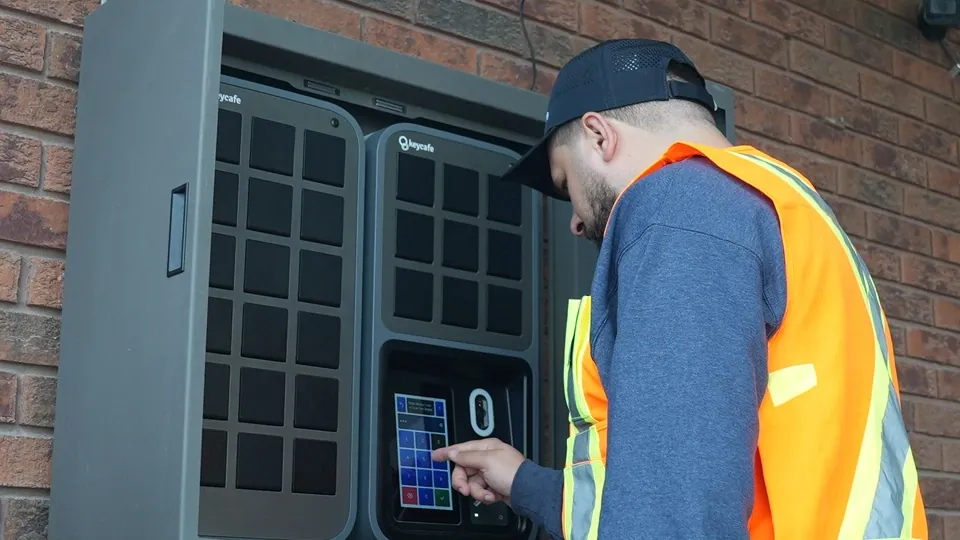

6:45 val. ryto automobilių stovėjimo aikštelė pilna, vairuotojai jau darbe, o prie raktų spintos – eilė. Vienas dispečeris dalija raktus, atsakinėja į klausimus ir stengiasi laikytis maršrutų grafiko. Po dešimties minučių pagaliau išrieda pirmieji sunkvežimiai.
Ši eilė ne tik atrodo lėta; ji pasireiškia vėluojančiais išvykimais, viršvalandžiais ir prarastais pristatymo laikotarpiais. Šis straipsnis paaiškina, kodėl rytais susidaro raktų eilės ir kaip išmanioji raktų valdymo sistema gali jas pašalinti, nepridedant papildomo darbo jūsų komandai.
Kodėl ryto raktų eilės yra daugiau nei tiesiog erzina
Automobilių parko vadovui tas 10–20 minučių laukimas kiekvieną rytą turi realių pasekmių:
Vairuotojams mokama už stovėjimą eilėje, o ne už krovinių ar keleivių gabenimą.
Dispečeriai yra prisirišę prie stalo dalindami raktus, užuot valdę išimtis ir paskutinės minutės pakeitimus.
Maršrutai prasideda vėliau, o tai sukelia praleistus laiko tarpsnius ir spaudimą visai likusiai dienai.
Pamesti ar ne vietoje padėti raktai tyliai eikvoja laiką, pinigus ir produktyvumą, o šie nuostoliai dar labiau padidėja, kai jie atsiranda kiekvienos pamainos pradžioje.
Ryto raktų eilės yra gilesnės problemos simptomas: jūsų prieigos procesas yra sukurtas aplink žmones, kurie fiziškai yra vienu metu, o ne aplink sistemą, kuri veikia pati.
Kas iš tikrųjų sukelia pamainos keitimo „butelio kakliukus“?
Dauguma ryto vėlavimų atsiranda dėl senų įpročių ir rankinių įrankių derinio. Galvojant apie raktų prieigos gerinimą automobilių parkams, yra keletas dažnų problemų, kurios pasireiškia realiame parke:
Neprižiūrimos spintelės raktams: Pigiose dėžutėse su bendrais kodais nėra įrašo, kas ką paėmė ar ar raktas buvo grąžintas.
Laukiama dispečerio: Vairuotojai stovi laukdami, kol ateis asmuo su pagrindiniu raktu ar spintelės prisijungimu ir išdalins raktus.
Saugumo spragos: Sargybos būdelėje arba stalo stalčiuje laikomi raktai skatina piktnaudžiavimą ir vagystes.
Popieriniai žurnalai ir bloknotai: Pamainos keitimo skuboje rašymas ranka yra neaiškus, praleidžiami laikai, o raktai perduodami ne tam vairuotojui.
Kai viskas priklauso nuo vieno asmens ir vienos fizinės vietos, beveik garantuojate eilę tuo metu, kai visiems ko nors prireikia vienu metu.
Kaip išmanioji raktų valdymo sistema pašalina ryto eiles
Šiuolaikinė raktų valdymo sistema, tokia kaip Keycafe, pakeičia „eilę prie stalo“ į savitarnos, patvirtintą prieigą. Štai kas pasikeičia.
1. Vairuotojai patys autentifikuojasi
Vairuotojai prie raktų prisijungia naudodami unikalų PIN kodą, QR kodą, mobiliąją programėlę arba esamą NFC ženklelį, o didesnio saugumo automobilių parkams siūloma dviejų faktorių autentifikacija.
Daugiau jokių bendrų spintelių kodų ar laukimo dispečerio su raktu. Kiekvienas vairuotojas įrodo, kas jis yra, o sistema automatiškai patikrina jo leidimus.
2. Išduodamas tik tinkamas raktas
Raktai laikomi atskiruose užrakinamuose skyriuose SmartBox viduje. Vairuotojui autentifikavus ir pasirinkus raktą, atsidaro tik nurodytas skyrius, o sistema registruoja:
Vairuotojo tapatybė
Paėmimo laikas
Paimtas konkretus raktas
Tai sumažina klaidas, kai „paimamas ne tas furgonas“, kurios sukelia paskutinės minutės sumaištį kieme.
3. Kiekvienas perdavimas yra užregistruotas
Visi paėmimai ir grąžinimai saugomi debesų pagrindu veikiančiame audito žurnale, kurį vadovai gali peržiūrėti iš žiniatinklio ar mobiliųjų programėlių. Matote, kas ir kada paėmė kurią transporto priemonę, visuose depuose.
Daugelio vietų parkams vienas prietaisų skydelis rodo raktų būseną kiekvienoje vietoje, užuot naudojus išsklaidytas skaičiuokles ar vietines spinteles.
4. Perdavimai ir pamainų keitimai tampa rutina
Kai Keycafe naudojama paskirstytame parke, į spintelę grąžinti raktai iškart tampa matomi kaip prieinami kitai pamainai, supaprastinant pamainų keitimą įvairiose vietose.
Užuot perduodamas raktus rankomis, išvažiuojantis vairuotojas dienos pabaigoje juos grąžina į SmartBox. Ryto vairuotojas tiesiog autentifikuojasi ir paima raktus iš to paties įrenginio (nereikia persidengimo ar asmeninio perdavimo).
5. Sistema veikia toliau, net jei tinklas neveikia
Naudojant raktų mainus neprisijungus ir akumuliatoriaus atsarginę kopiją, SmartBox gali toliau suteikti prieigą interneto ar elektros energijos tiekimo sutrikimų metu, o prisijungimui grįžus sinchronizuoti operacijas.
Tai reiškia, kad jūsų pirmoji pamaina vis tiek gauna raktus 5:30 val. ryto, net jei tinklas neveikia, užuot stovėję tamsoje laukiant IT.
Žaidimo planas, kaip sumažinti ryto raktų eiles
Jei esate pasirengę atsikratyti raktų eilių, štai praktinė seka, kurios galite laikytis.
1 žingsnis: Susipažinkite su savo ryto eiga
Vieną savaitę stebėkite pirmąsias 60 dienos minučių:
Kuriuo metu vairuotojai iš tikrųjų atvyksta?
Kur ir ko jie laukia?
Kiek laiko praeina nuo „prisiregistravimo“ iki „transporto priemonės pajudėjimo“?
2 žingsnis: Perkelkite raktus į SmartBox, esantį netoli vietos, kur vairuotojai pradeda darbą
Pastatykite savo SmartBox ten, kur natūraliai atvyksta vairuotojai: prie automobilių stovėjimo aikštelės įėjimo, dispečerinės ar kiemo vartų.
Perkelkite visus parko raktus į SmartBox ir atsisakykite ad hoc saugyklų, tokių kaip stalčiai ar sargybos būdelės. Daugelio vietų parkams naudokite sujungtas spinteles kiekviename kieme, visas susietas su viena paskyra.
3 žingsnis: Nustatykite vairuotojų profilius ir leidimus
Sukonfigūruokite kiekvienam vairuotojui jo prisijungimo metodą ir suteikite prieigą tik prie transporto priemonių ar raktų grupių, kurias jie turėtų naudoti. Keycafe rekomenduoja unikalius PIN kodus ar ženklelius, valdomus centralizuotai, siekiant nuoseklaus, bet patogaus prieigos valdymo visose vietose.
Galite:
Apriboti tam tikrų sunkvežimių (pvz., pavojingų krovinių ar didelės vertės vienetų) naudojimą konkretiems vairuotojams.
Apriboti prieigą pagal laiko intervalą, kad raktų nebūtų galima paimti už suplanuotos pamainos ribų.
4 žingsnis: Leiskite vairuotojams pasiimti raktus prieš piko valandą
Sukonfigūruokite prieigos taisykles taip, kad vairuotojai galėtų pasiimti raktus šiek tiek anksčiau nei jų oficialus darbo pradžios laikas, be prižiūrėtojo.
Vairuotojai, kurie mėgsta anksti pradėti, gali pasiimti raktus, atlikti patikras prieš kelionę ir būti pasiruošę išvykti, kai prasidės jų pamaina.
5 žingsnis: Naudokite įspėjimus išimtims, o ne kasdieniam raktų dalinimui
Užuot dispečeriui dalijus kiekvieną raktą, naudokite įspėjimus tais atvejais, kai tikrai reikia dėmesio:
Informuokite dispečerį, kai paimamas raktas, skirtas prioritetiniam maršrutui.
Siųskite priminimą apie vėlai grąžintą raktą, jei naktinis vienetas negrąžinamas iki nustatyto laiko.
Nukreipkite webhook įspėjimus į Slack, Teams arba savo TMS, kad vadovai matytų problemas jau naudojamuose įrankiuose.
Tikslas paprastas: sistema tvarko įprastus rytus; žmonės įsikiša tik tada, kai kažkas ne taip.
6 žingsnis: Peržiūrėkite savo duomenis ir patobulinkite
Kai visi raktų perdavimai bus atlikti per SmartBox, galėsite eksportuoti prieigos žurnalus ir pamatyti:
Kokie raktai visada paimami pamainos pradžioje
Kokie vairuotojai ar maršrutai reguliariai sukelia vėluojančius grąžinimus
Ar kai kurios vietos vis dar lėčiau pradeda veikti
Kaip iš tikrųjų atrodo „ryto eilės nėra“
40 transporto priemonių regioniniam pristatymo parkui pokytis dažnai atrodo taip:
Ryto raktų paėmimas | Rankiniai metodai | Keycafe SmartBox |
|---|---|---|
Atvykimo patirtis | Vairuotojai stovi eilėje prie stalo, spintelės ar sargybos būdelės, laukdami raktų | Vairuotojai eina tiesiai prie SmartBox ir iškart patys autentifikuojasi |
Laikas gauti raktus | Nuo 10 iki 20 minučių, priklausomai nuo eilės ir dispečerio užimtumo | Sekundės vienam vairuotojui be bendro laukimo |
Priklausomybė nuo personalo | Paėmimas priklauso nuo dispečerio ar prižiūrėtojo buvimo | Nereikalingas personalas įprastam paėmimui |
Raktų prieigos metodas | Bendri kodai, popieriniai žurnalai arba žodinis perdavimas | Individualus PIN, QR kodas, programėlė arba ženklelis |
Tinkamas transporto priemonės priskyrimas | Vairuotojai piko metu gali paimti netinkamą raktą | Išduodami tik priskirti raktai |
Matomumas vairuotojams | Neaišku, ar raktas paruoštas ar grąžintas | Raktų prieinamumas aiškus spintelėje |
Pasirengimas pamainos pradžiai | Patikros prieš kelionę prasideda vėlai dėl vėlavimų | Patikros prieš kelionę gali prasidėti nedelsiant |
Atskaitomybė | Vairuotojai pasikliauja atmintimi arba popieriniu išsiregistravimu | Paėmimas registruojamas automatiškai su pavardės ir laiko įrašu |
Vėlavimų valdymas | Problemos aptinkamos, kai maršrutai jau vėluoja | Išimtys pažymimos, kai jos atsiranda |
Į procesą nebuvo pridėta nieko „papildomo“, tiesiog perkėlėte prieigą nuo asmens į automatizuotą sistemą, kuri veikia taip pat kiekvieną dieną.
Nuo eilių prie sklandaus darbo: paverskite pamainos keitimą vėl rutina
Ryto raktų eilės neturėtų būti „tik darbo dalis“. Jos yra ženklas, kad jūsų raktų prieigos procesas vis dar per daug priklauso nuo žmonių buvimo tinkamoje vietoje tinkamu laiku.
Naudodami savitarnos raktų paėmimą, aiškius leidimus ir automatinius įspėjimus, galite paversti pamainos keitimą iš kasdienės kliūties į nuspėjamą, greitą rutiną, palaikančią likusią jūsų veiklos dalį.
Pasiruošę sustabdyti ryto raktų eiles ir suteikti vairuotojams tiesioginę, sekamą prieigą prie transporto priemonių kiekvienos pamainos pradžioje? Užsisakykite demonstraciją, kad pamatytumėte, kaip Keycafe išmanioji raktų valdymo sistema gali palaikyti jūsų parko pamainų keitimus, sumažinti vėlavimus ir atsakyti į jūsų klausimus.