
Features Update

    User Key Limits, Field Swaps, and Use Your Company Badges

    2 minutes
    Features Update 2025: User Key Limits, Field Swaps, and Use Your Company Badges
    Gideon Leung

    Author

    Gideon Leung

    Product Marketing Manager

    Gideon Leung is the Product Marketing Manager at Keycafe, leading global marketing and serving as the company's product expert. He writes the technical documentation, feature announcements, product updates, and how-to guides that help customers worldwide get the most out of the platform.

    Category

    Features Update

    Published
    Last Reviewed

    Keycafe has launched new features: maximum key limits per user, instant keyholder identification, direct key transfers between users (Field Swaps), and integration with existing company NFC access badges for user authentication. These updates enhance key management efficiency and

    Set Maximum Keys Per User

    Need to limit how many keys a user can have checked out at once? Now you can! With the new Maximum Keys setting, you can specify a cap on how many keys a particular user can check out simultaneously, helping to prevent key hoarding and ensure availability for your entire team.

    Learn how to use Maximum Keys.

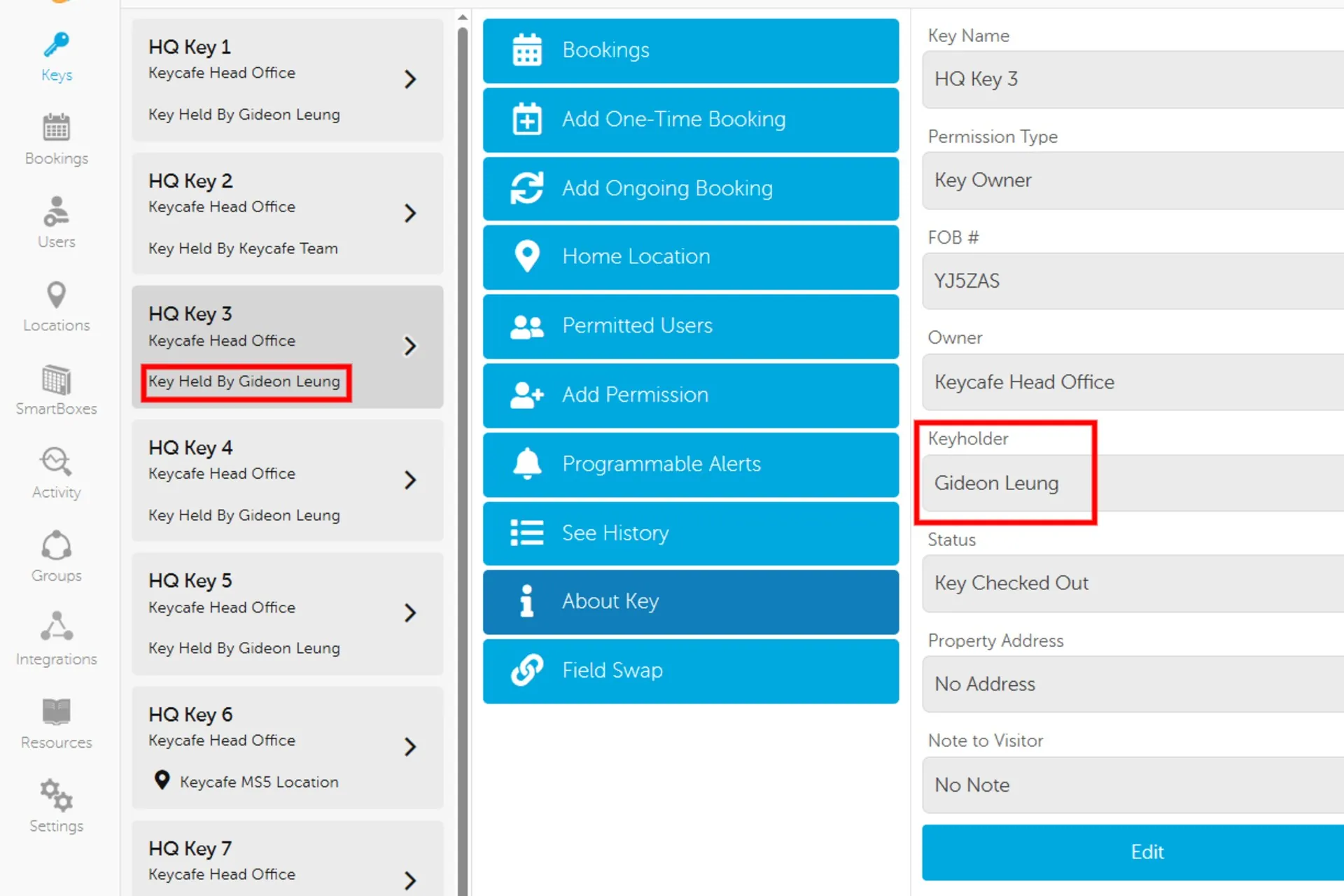
    New Key Detail: Keyholder

    Screenshot of Keycafe desktop app

    Keeping tabs on your keys just got easier with the new Keyholder field, allowing you to see who currently has the key checked out at a glance. This small but powerful update gives admins and users the ability to more quickly find out who they need to contact to retrieve a key.

    Field Swaps

    Our new Field Swaps feature allows users to transfer custody of a key to another user - without dropping the key off at a SmartBox. In other words, designating a new Keyholder for the key while it is being used. Perfect for users who share keys with each other on the go, this feature saves time and opens up new workflows.

    See how Field Swaps work.

    Company Access Badges

    Organizations can now link their existing non-Keycafe NFC staff access badges to Keycafe users, enabling user authentication without requiring a dedicated Keycafe badge or code. This is ideal for companies with internal access cards or fobs that are already used for access control.

    See how to link external badges.

    Questions?

    Have feedback about these new features, or suggestions for other improvements you’d like to see? Let us know in our Subreddit!

    Frequently Asked Questions

    Administrators can now set a specific cap on the number of keys an individual user is permitted to have checked out simultaneously. This "Maximum Keys" setting helps prevent key hoarding and ensures that essential keys remain available for the rest of the team. By controlling these limits, organizations can maintain better asset rotation and operational availability.

    A new "Keyholder" field has been added to the key details, allowing administrators and users to see exactly who has a key checked out at a glance. This update is designed to help team members quickly identify the person they need to contact for a key retrieval. It streamlines communication by removing the guesswork from tracking down missing or in-use assets.

    The "Field Swaps" feature allows users to transfer custody of a key directly to a colleague while in the field. While the key is never physically returned to a SmartBox during this process, the system still records the transfer and updates the audit trail to reflect the new Keyholder. This saves significant time for mobile teams while ensuring that a complete record of custody is maintained.

    Organizations can link their existing non-Keycafe NFC staff access badges directly to the system for user authentication. This allows employees to use their current company badges or fobs instead of requiring a separate Keycafe code or dedicated credential. Integrating existing cards simplifies the login process and aligns key access with established internal security policies.

    Ready for smart key management

    Customize and purchase your SmartBox deployment today or you can get in touch with our sales team to learn more about how we can help your business.

    Learn about our devices

    Discover how the Keycafe SmartBox and our cloud platform secure, track, and automate every key exchange.

    Business Key Management

    Find the right plan for you

    Flexible pricing that scales with your team. Compare plans and pick what fits your operation.

    Pricing Details