
Features Update

    New Keycafe Features Update May 2024

    2 minutes
    Keycafe May 2024 updates: SmartBox video recording, key search, LED customization, and user autocomplete for faster, more secure key management.
    Gideon Leung

    Author

    Gideon Leung

    Product Marketing Manager

    Gideon Leung is the Product Marketing Manager at Keycafe, leading global marketing and serving as the company's product expert. He writes the technical documentation, feature announcements, product updates, and how-to guides that help customers worldwide get the most out of the platform.

    Category

    Features Update

    Published
    Last Reviewed

    Keycafe's May 2024 update introduces SmartBox video recording for security, key search for easier access, LED and screen color customization for branding, user autocomplete for faster permission management, and a new Release Notes article for bug fixes.

    We’re excited to announce several new features and improvements to the Keycafe app and SmartBox that will further transform your key management experience. Here's what's new for May 2024:

    SmartBox Video Recording

    Our highly anticipated Video Recording feature is now available! Organizations can automatically record each time a key is picked up or dropped off at the SmartBox.

    This feature enhances security and accountability, providing peace of mind for key management. Available on the Premium and Business Pro plans with an MS5 SmartBox.

    Learn more about how to set up and use this feature.

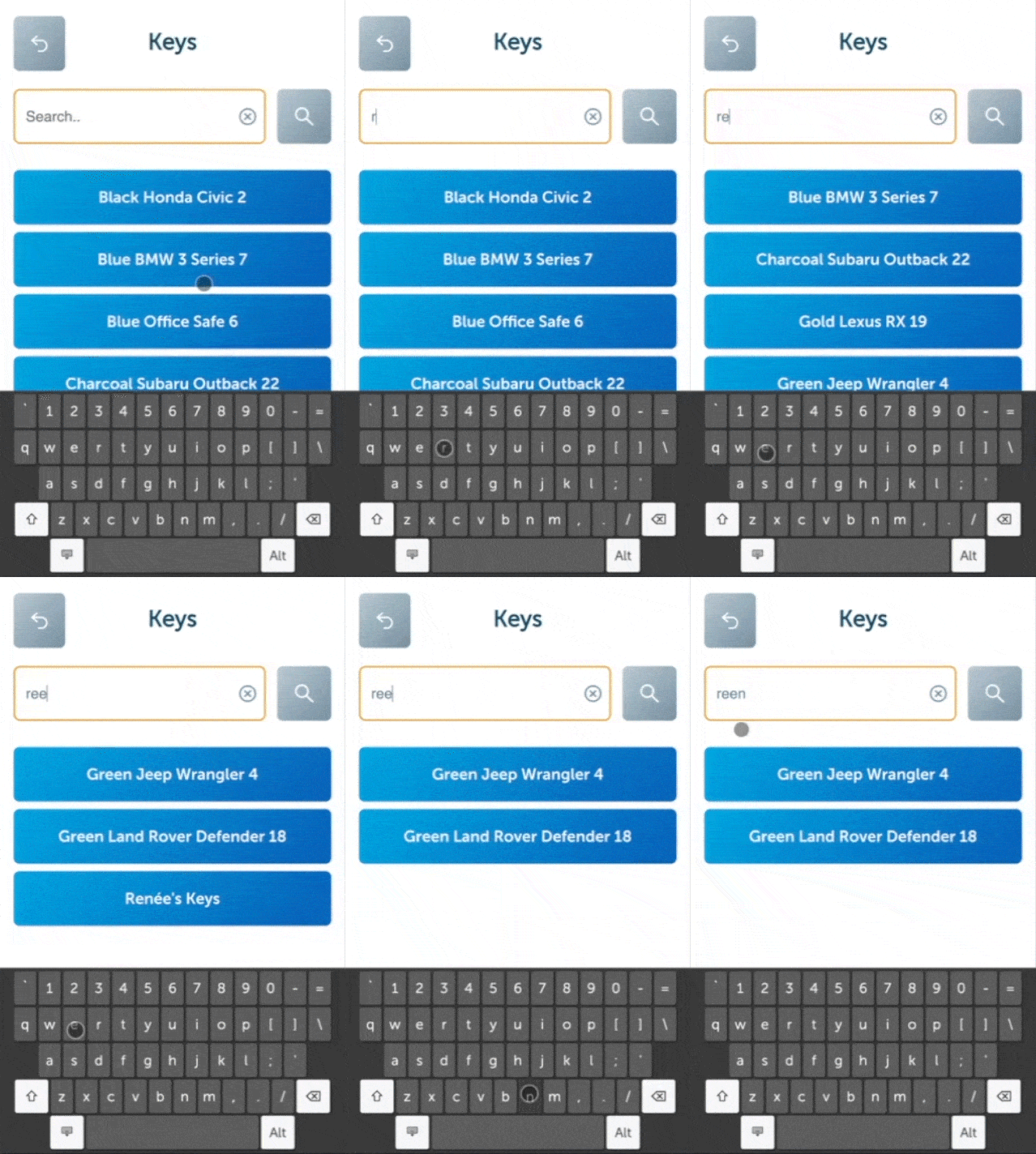
    No more scrolling! For users with access to multiple keys, a search bar is now available on the key selection screen during key pickups.

    For most users (with <50 keys), the list will automatically filter as you type. For users with access to many keys (>50), simply tap the search button after typing and the list will update.

    Try it on your MS5 or MS4 SmartBox today!

    SmartBox LED and Screen Colour Customization

    We’re introducing two new options to customize your SmartBoxes to better match your brand image and improve the user experience:

    • LED Ring Colour: Change the colour of the LED ring around the camera on the MS5 to match your logo, environment, or any other colour you’d like. You can also choose between breathing, flashing, or solid lighting patterns.

    • Screen Colour Gradients: Create custom colour gradients for the buttons, banners, and text on the SmartBox screen.

    Explore the customization options and how to implement them.

    User Autocomplete

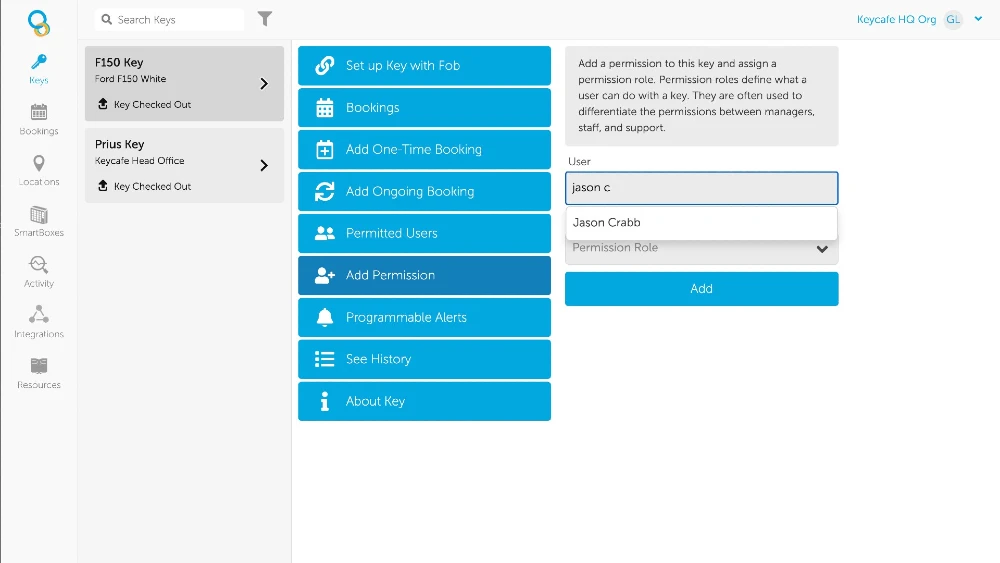
    Adding user permissions just got easier with our new User Autocomplete feature. When adding a permission to a key, key group, or location, you can start typing a user’s name and a dropdown menu will appear with suggested names, making it faster and more efficient to manage user access.

    This feature can be used for names of both Full and SmartBox Users. Try it out today in your Keycafe app!

    Release Notes

    Stay informed with our new Release Notes article in the Keycafe Help Centre. This article provides the latest bug fixes and improvements to the Keycafe app and SmartBox software. Also included are helpful links to read more about important updates.

    Check out the latest release notes here.

    Frequently Asked Questions

    Organizations can now automatically capture video footage every time a key is picked up or returned at a SmartBox. This feature is designed to enhance accountability by providing visual confirmation of the individual performing the transaction. It is available for customers using the MS5 SmartBox on either the Premium or Business Pro software plans.

    A search bar has been added to the key selection screen on the SmartBox to eliminate the need for manual scrolling. For users with access to fewer than 50 keys, the list filters automatically as they type their search query. Users managing more than 50 keys can enter their search term and tap a button to update the list, ensuring rapid access even in large-scale deployments.

    Administrators have access to a live dashboard that provides an at-a-glance overview of all properties and their current statuses. To ensure system reliability, Keycafe offers a "System Status" page and "Remote Troubleshooting" capabilities to resolve issues without visiting the physical site. For deeper technical oversight, an API reference and real-time connectivity alerts help teams stay informed about the network health of their IoT devices.

    Ready for smart key management

    Customize and purchase your SmartBox deployment today or you can get in touch with our sales team to learn more about how we can help your business.

    Learn about our devices

    Discover how the Keycafe SmartBox and our cloud platform secure, track, and automate every key exchange.

    Business Key Management

    Find the right plan for you

    Flexible pricing that scales with your team. Compare plans and pick what fits your operation.

    Pricing Details