
Key management affects vehicle availability, accountability, and access control within a dealership. Whether it’s locating keys for a test drive, handing vehicles off between departments, or supporting after-hours access, the system behind the scenes matters.
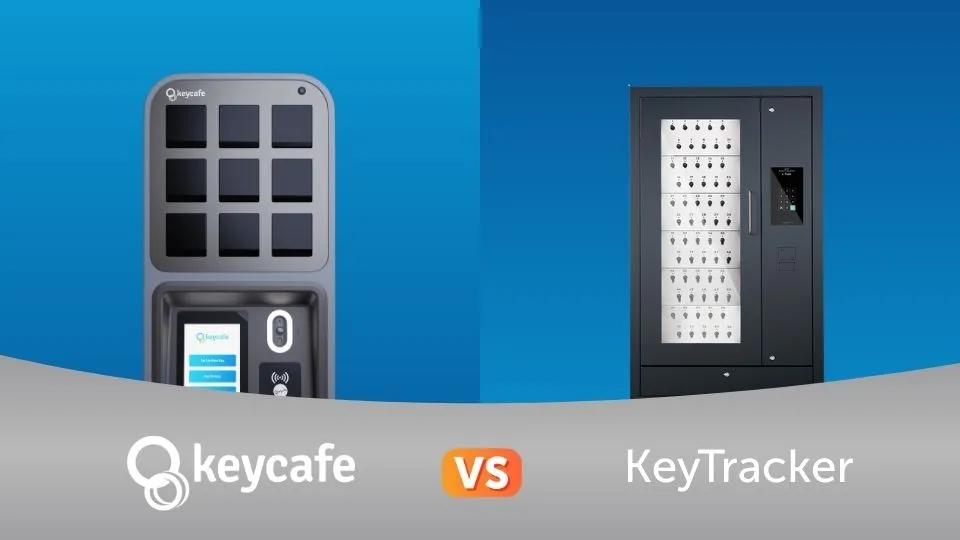
This article provides an in-depth comparison of two electronic key management systems: Keycafe and KeyTracker.
To ensure a precise and meaningful evaluation, this comparison focuses exclusively on KeyTracker’s electronic key systems and key cabinets that are functionally comparable to Keycafe’s electronic key management system. This comparison evaluates features, reliability, connectivity, and day-to-day workflow support.
1. Basic Functions and Workflows of Key Control
Feature | Keycafe | KeyTracker |
|---|---|---|
Unique access or booking codes | ✓ | ✓ |
Real-time activity log | ✓ | ✓ |
Individual user access codes | ✓ | ✓ |
Partner software integration | ✓ | ✓ |
User-level permissions | ✓ | ✓ |
Permissions for specific key groups | ✓ | ✓ |
Mobile access management | ✓ | ✓ |
Multi-organization accounts | ✓ | ✓ |
Customizable notifications and alerts | ✓ | Limited |
Trackable key handoff between staff | ✓ | - |
Limited time reservations | ✓ | - |
Shift-based access control | ✓ | - |
Keycafe includes additional workflow controls not listed in KeyTracker’s standard feature set.
Keycafe supports time-based workflows and mobile access control, allowing managers to assign permissions by user, role, shift, or key group, and to set limited-time reservations for test drives or service appointments. These settings allow managers to assign time-based access and limit key usage by user or role. Direct key handoffs allow staff to pass keys between authorized users without returning them to the system, while still maintaining visibility into who has the keys. These settings can be managed through the web dashboard or mobile app.
KeyTracker provides reliable access control and tracking, but several workflow-driven features such as shift-based access and time-limited reservations are not supported. While it does offer mobile access management, limitations around workflows mean dealerships may need to rely more on manual coordination during busy periods or when handling handoffs between departments.
2. Authentication Methods
Authentication mode | Keycafe | KeyTracker |
|---|---|---|
User access code | ✓ | ✓ |
NFC / RFID user credential | ✓ | ✓ |
Unique booking codes | ✓ | - |
Mobile app | ✓ | - |
Scan QR code | ✓ | - |
Two-factor authentication (2FA) | ✓ | - |
Fingerprint reader (biometric access) | - | ✓ |
Authentication options determine how users verify access to keys.
Keycafe supports multiple authentication methods, including user access codes, NFC credentials, QR codes, unique booking codes, mobile app access, and two-factor authentication. For setups with a large number of keys, the mobile app makes it easier to locate the right key before going to the box, allowing users to view key availability before retrieving it. This range of options helps teams manage access for staff, customers, and temporary users while maintaining strong security.
KeyTracker supports access codes, RFID credentials, and biometric authentication in some configurations, but does not support mobile app access, QR codes, booking codes, or two-factor authentication.
3. Hardware Design and System Reliability
Capability | Keycafe | KeyTracker |
|---|---|---|
Cloud-connected electronic hardware | ✓ | ✓ |
Automatic software and firmware updates | ✓ | ✓ |
Modular and expandable hardware design | ✓ | ✓ |
Backup battery | ✓ | ✓ |
Fail-safe disassembly or emergency access system | ✓ | ✓ |
Centralized multi-location hardware management | ✓ | ✓ |
Individual electronically locked compartments (per key) | ✓ | - |
Offline operating mode | ✓ | - |
Offline access codes | ✓ | - |
Built-in video recording | ✓ | - |
Both systems use electronic locking hardware, but their capabilities differ in reliability, offline access, and remote control.
Keycafe supports cloud-connected hardware with offline operation features. Its SmartBoxes store each key in its own individually locked compartment, ensuring one key per access and reducing the risk of misuse compared to clear door cabinets where all keys are visible. The hardware supports true offline operation, offline access codes, and a backup battery for power outages, so access is not dependent on a live internet connection. Built-in video recording adds accountability during key exchanges, and centralized cloud management allows teams to monitor and manage hardware across multiple locations from a single dashboard.
KeyTracker provides cloud connected electronic hardware with automatic software updates, modular design, backup battery support, and centralized hardware management. Its cabinets are intended for connected, on site use and rely on active internet connectivity for normal operation. The system does not support individual electronically locked compartments per key, offline operating mode, offline access codes, or built in video recording;
4. Daily Dealership Workflow Support
Workflow Feature | Keycafe | KeyTracker |
|---|---|---|
Real-time key availability view | ✓ | ✓ |
Role-based access by department | ✓ | ✓ |
Mobile management for managers | ✓ | ✓ |
After-hours customer access | ✓ | - |
Key reservations for appointments | ✓ | - |
Maximum keys per user limits | ✓ | - |
Temporary access for customers or contractors | ✓ | - |
Keycafe supports scheduled access and remote permission management. After hours access allows staff or customers to pick up and return keys 24/7, which allows key pickup and return outside regular business hours. Managers can use mobile management to view key availability, manage reservations, and adjust permissions remotely. Appointment based reservations, maximum keys per user, direct key handoffs, and temporary access for customers or contractors help teams move vehicles through sales and service without delays.
KeyTracker supports core workflows such as real time key visibility, role based access by department, and mobile management for managers. While managers can view and manage keys remotely, workflow controls are more limited. The system does not support after hours customer access, appointment based reservations, temporary customer access, or limits on keys per user.
5. Pricing Structure and Scalability for Dealerships
Feature | Keycafe | KeyTrak |
|---|---|---|
Hardware expansion without replacing existing units | ✓ | ✓ |
Publicly listed pricing | ✓ | - |
Cloud-based subscription software | ✓ | - |
Clearly defined recurring software pricing | ✓ | - |
Keycafe uses a transparent, subscription-based pricing model designed for dealership scalability. Key pricing and cost structure details include:
Publicly available pricing: Costs are listed online, allowing dealerships to evaluate pricing without a sales call or custom quote.
Subscription-based software model: Monthly software fees are tied to the dealership location.
Cost-effective expansion: The initial purchase includes a SmartBox base unit, with additional expansion units added through a one-time hardware cost.
No added software fees for expansions: Increasing key capacity does not increase monthly software costs.
Predictable long-term pricing: Well suited for dealerships managing inventory growth or multiple locations.
KeyTracker supports scalable electronic key cabinets for dealership environments, but pricing and cost structure are handled differently:
Quote-based pricing: Public pricing is not listed online and typically requires a custom quote.
Hardware-driven expansion: Additional capacity is added through new cabinets or hardware configurations.
Configuration-dependent software costs: Licensing, support, and ongoing costs vary based on deployment size and setup.
Cost planning tied to vendor quotes: Long-term budgeting often depends on future configuration decisions.
Keycafe vs KeyTracker: Choosing the Right Key Management System for Your Dealership
Both Keycafe and KeyTracker solve the fundamental challenge of tracking and controlling dealership keys, but they are built to support different operational needs.
KeyTracker offers electronic key cabinets designed primarily for on-site, location-based key control. With basic access permissions, activity logs, and scalable hardware, it can support dealerships that prefer structured storage with limited workflow customization.
Keycafe is built for dealerships that require speed, flexibility, and visibility across departments and locations. Its cloud-based key management system supports mobile management, time-based access, appointment reservations, direct key handoffs, offline operation, and centralized control across multiple rooftops. Transparent pricing and a subscription model that scales without increasing recurring costs further simplify long-term planning.
For dealerships managing high vehicle turnover, multiple departments, after-hours access, or multi-location operations, Keycafe provides a broader set of tools to support modern dealership workflows. Its focus on real-time control, accountability, and predictable scalability that may fit dealerships that require mobile workflows, after-hours access, or multi-location oversight.
See Keycafe in Action
Want to see how Keycafe could work for your dealership? Book a demo to see the system in action and explore how it supports real-world dealership workflows.